Curtains Icons: Clean, Versatile Icon Set for Every Project
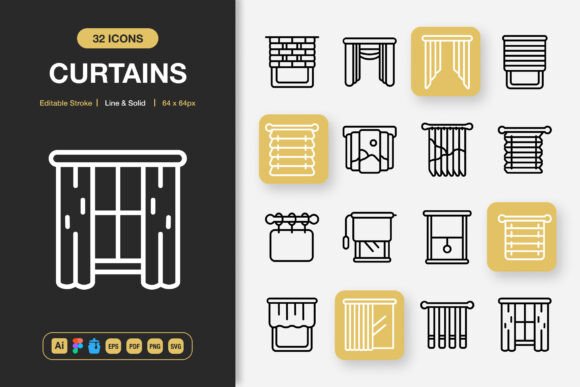
Every creative project benefits from a set of icons that feel unified, modern, and easy to work with. Curtains Icons delivers just that—a collection of high-quality minimalist icons built to adapt to websites, mobile apps, social media graphics, printed materials, and much more. With both line and solid styles, fully editable strokes, and a drag-and-drop workflow, this set helps you move from concept to polished result without the usual back-and-forth of icon hunting.
Why Minimalist Icons Matter More Than Ever
Minimalism in design isn't about doing less—it's about communicating clearly. Icons that strip away unnecessary detail feel approachable, load faster, and work across varied backgrounds. Whether you're building a sleek app interface or a printed flyer, a set like Curtains Icons ensures your icons stay consistent without competing with other visual elements. Their clean geometric silhouettes and balanced proportions help direct attention exactly where you want it.
Because the pack includes both line and solid versions, you can create visual hierarchy instantly. Use the outline style for secondary actions and the filled style for primary buttons, or mix them subtly throughout a single layout to guide the eye naturally.
What’s Inside the Curtains Icons Collection
One of the biggest time-savers is the variety of file formats provided. You don’t need to convert anything or hunt for a compatible version. The download includes:
- Source files for Adobe Illustrator and Figma, so you can edit every icon from scratch.
- Iconjar file for organized browsing and quick drag-and-drop into design tools.
- EPS (Version 10), PDF, and SVG files for universal scalability.
- PNG files with transparency in seven common sizes: 32px, 48px, 64px, 96px, 128px, 256px, and 512px.
Each file type has been prepared to look sharp at any resolution, whether you’re placing an icon in a presentation deck or a high-DPI mobile screen. The ready-to-use PNGs save you from exporting individual assets, while the editable source files give you complete freedom to change stroke weight, color, or even the shape itself.
Designed for Real Projects, Not Just Dribbble Shots
The true test of any icon set is how it holds up in a working document. Curtains Icons was created with real-world use in mind. Uniform padding, pixel-perfect alignment, and thoughtful naming conventions reduce friction, so you can focus on the creative work. The easy drag-and-drop feature, especially through the Iconjar container, makes it simple to pull icons straight into Sketch, XD, or whatever tool you prefer without breaking your flow.
Because the stroke is editable, you can match icon thickness to your brand’s typography weight in seconds. Adjust the stroke weight or switch to a softer color palette in seconds. The set’s 100% customizable nature means you’re never locked into the default style.
Where You Can Put These Icons to Work
The versatility of Curtains Icons opens up possibilities across many creative fields. Here are a few practical examples:
- Web and UI designers can build intuitive navigation bars, feature sections, and onboarding flows with a modern, consistent look.
- Mobile app creators benefit from crisp icons that stay legible on small screens and adapt well to light or dark modes.
- Bloggers and small business owners can add visual appeal to newsletters, social media graphics, and promotional flyers without needing a professional designer.
- Print and presentation designers will appreciate the high-resolution assets for brochures, slide decks, and signage.
In each case, the combination of line and solid styles gives you the flexibility to match the tone of your project—friendly and approachable, or sleek and corporate.
How Editable Strokes Change Your Workflow
One feature that sets this collection apart is the fully editable stroke capability. Instead of being locked into a single line weight, you can adjust the thickness after placing an icon. That’s a game-changer when you’re working with different font families or you need to resize an icon significantly. Whether you need a delicate line for a hero banner or a bold stroke for a promo flyer, you can create both from the same file. The control stays in your hands, and you don’t need to download a second version of the icon.
This level of customizability also means the set can grow with your brand. If you refresh your visual identity down the road, you can update the icons to match without hunting for a new pack.
Getting Started Without a Steep Learning Curve
Even if you’re relatively new to design tools, Curtains Icons is built to be approachable. The included Readme.txt gives you a quick overview of how to access and use each file type. If you’re comfortable dragging a file into your workspace, you’re already ready. No plugins, no subscription fees, no complicated licenses—just assets you can start using within minutes of download.
Beginners often worry about pixelation or quality loss when scaling. Because the set provides both vector and multiple PNG sizes, you can work at any dimension with confidence. Vectors stay sharp at any size, while PNGs are ready for quick placement.
Things to Consider When Choosing an Icon Set
Before you dive in, it’s worth thinking about a few aspects that affect long-term satisfaction with a pack like this. First, check that the style aligns with your project’s overall look. While minimalist icons are flexible, they won’t suit every retro or highly illustrative brand. Curtains Icons works best when you want a contemporary, uncluttered aesthetic.
Next, consider how often you plan to edit the icons. If you frequently need to tweak shapes, the source files (AI and Figma) are essential. If you mostly use icons as-is, the Iconjar integration and PNGs will cover most of your needs. Also, while the set includes multiple file types, make sure your primary design software can open them. Most modern tools handle SVG and EPS without issues, but older legacy programs may require conversion.
Finally, think about your audience. The transparent backgrounds and consistent sizing mean these icons drop seamlessly onto white, colored, or photographic backgrounds—so they’re safe for almost any composition.
Bringing It All Together in Your Next Project
Perhaps the strongest reason to reach for Curtains Icons is how quickly it can change the feel of your work. A sharp, cohesive icon set can make a portfolio website look more credible, turn a simple flyer into a polished advertisement, or give your social media posts the visual consistency that builds trust. Because the pack covers everything from large banners to tiny favicon-sized graphics, you’ll rarely find yourself searching for a missing piece.
The minimalist foundation, dual style options, and editable strokes let you put your own spin on each icon while maintaining a unified appearance. And because the download includes all the important file formats, you won’t be stuck mid-project trying to convert a file. It’s the kind of resource that works as hard as you do—supporting spontaneous creative bursts as easily as long-term commercial campaigns.
Whether you’re a seasoned designer looking to refresh your toolkit or a newcomer eager to build something beautiful, these icons fit right into the workflow you already have. And that’s the whole point: quality design assets should never slow you down. They should simply work.