Chemistry Icons: A Versatile Asset for Modern Design Workflows
Designers, educators, and science communicators often need visual elements that convey complex ideas with clarity. A dedicated icon set can transform a cluttered interface or a dense report into an approachable, professional piece. Chemistry Icons is one such resource—a collection of high-quality, editable graphics built to serve a wide range of projects. Whether you are prototyping a mobile app, laying out a textbook, or preparing social media graphics, the right visual toolkit can save hours and maintain consistency. Before choosing any icon set, it helps to understand how it compares with alternatives, what tradeoffs exist, and when it truly fits your workflow.
What Sets Chemistry Icons Apart in a Competitive Landscape
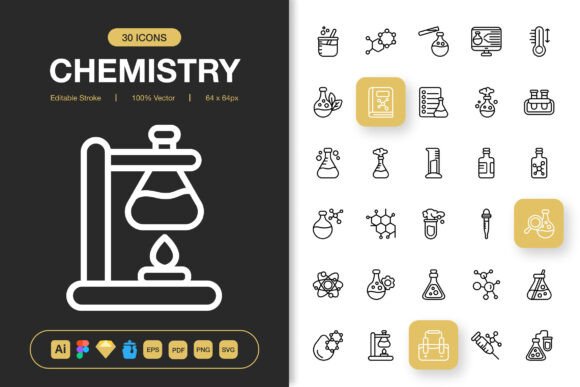
Icon marketplaces and free repositories offer thousands of options, but many collections lack cohesion or editing flexibility. Chemistry Icons is designed to bridge that gap by providing 100 customizable icons with an emphasis on editable stroke design. Instead of pre-filled shapes that resist modification, these icons arrive as vector paths that can be recolored, reshaped, and restyled without loss of quality. This approach competes favorably against rigid, single-color icon fonts or uneditable PNG packs, giving you control over line weight, cap style, and join type directly in your favorite vector tool.
Another differentiator is the careful attention to output formats. Many standalone sets offer either SVG or PNG, but rarely both at multiple resolutions—and source files are often omitted. Here, the inclusion of Adobe Illustrator, Figma, Sketch, and Iconjar files means you can start customizing immediately, regardless of your preferred environment. This format diversity compares well to more limited alternatives, where designers must manually convert or trace files, adding unnecessary steps.
File Format Versatility: From Source Artwork to Production-Ready Assets
The way an icon set handles file delivery often determines how smoothly it fits into real-world pipelines. Chemistry Icons ships with a comprehensive list of formats: AI (Illustrator), EPS, SVG, PDF, Figma, Sketch, Iconjar, and PNG. The PNGs come at seven different sizes—32px, 48px, 64px, 96px, 128px, 256px, and 512px—covering everything from tiny UI elements to large print graphics.
For web developers, SVG is the obvious choice because of its small file size, scalability, and animation potential. For print designers, the EPS and PDF versions preserve crisp lines at any scale, compatible with layout applications like InDesign. UI/UX designers benefit from the Figma and Sketch files, which support drag-and-drop directly into component libraries. And if you manage large icon collections, the Iconjar file helps you search and organize assets without cluttering your desktop. When evaluating icon resources, this kind of format coverage often outweighs cheaper or free sets that only supply a single file type, forcing you to recreate work for different media.
Editable Stroke Design: The Balance Between Quality and Flexibility
One of the most practical features of Chemistry Icons is the use of genuinely editable strokes. In technical terms, this means each icon is constructed with stroked paths rather than expanded filled shapes. The benefit? You can adjust the thickness of lines, convert corners from round to sharp, and even apply dashed styles—all with a few clicks inside Illustrator, Figma, or Sketch. This level of customization is especially valuable when you need icons to match an existing brand system or to create a visual hierarchy between different product sections.
There is a tradeoff, however. Some projects demand solid, filled icons (often called “flat” style) with no outlines. While you can expand the strokes and fill them in a vector editor, the initial design language of Chemistry Icons leans toward line-based aesthetics. If your project strictly requires a solid silhouette approach, you may need to invest extra editing time. Yet, for many modern interfaces and infographics, the outline style feels contemporary, approachable, and pairs well with minimalist layouts. The high quality of the artwork ensures that even after modification, the icons retain their professional appearance—something not always guaranteed with less polished freebies.
Where Chemistry Icons Naturally Fits: Projects and Mediums
The sheer breadth of use cases makes this set a strong candidate for mixed-media projects. Consider these typical scenarios where Chemistry Icons can become a default resource:
- Website design: Educational platforms, lab management dashboards, or science blog illustrations.
- Mobile apps: Icons for interactive periodic tables, lab safety guides, or reaction simulation interfaces.
- Print materials: Textbooks, lab manuals, conference posters, and flyers that need scalable vector art.
- Infographics and presentations: Clear symbols for chemical processes, equipment, and data visualization.
- Social media graphics: Eye-catching posts about chemistry facts or educational content with consistent iconography.
The drag-and-drop compatibility with Figma and Sketch accelerates UI prototyping. Instead of exporting and importing separate files, you can pull icons straight from the source file into your design system, maintaining one source of truth. For print designers, the multi-resolution PNGs provide ready-made raster images that don’t require resampling in Photoshop, reducing production time and avoiding quality loss.
When Another Approach or Additional Resources Might Be Needed
No single icon set covers every conceivable requirement, and Chemistry Icons is no exception. The library focuses on fundamental chemistry symbols, glassware, atoms, bonds, and common lab apparatus. While extensive, it may not include extremely specialized equipment like mass spectrometers, glove boxes, or specific analytical instruments. If your project demands niche scientific visuals, you might need to supplement with custom illustrations or a more domain-specific collection.
Another consideration is style variation. The set embraces a clean, minimalist line aesthetic with a modern feel. If your brand calls for a hand-sketched chalkboard look, highly detailed isometric renderings, or a playful cartoon style, these icons might not align without substantial manual rework. Similarly, if you need animated icons (Lottie, GIF, or CSS sprites), you would start from the SVG files and build animations separately—a feasible but time-intensive step. For teams without animation expertise, a pre-built animated chemistry set could be a more direct path.
Furthermore, while the 100 customizable icons cover many common needs, large-scale platforms with hundreds of screens might find the quantity limiting. In that case, combining this set with complementary generic icon collections, or commissioning a custom expansion, could ensure design consistency at scale.
Key Decision Factors When Choosing an Icon Set
Evaluating any design resource means weighing practical criteria against project constraints. With Chemistry Icons, the following factors often surface during comparison:
- Editing capability: Editable strokes beat static PNGs when you need to adjust colors to match a brand palette. The source files (AI, Figma, Sketch) make deep customization possible.
- Format compatibility: A single integrated download containing EPS, PDF, SVG, and icon management files eliminates format-conversion headaches.
- Size variations: Seven PNG sizes mean you don’t have to worry about scaling artifacts for retina displays or high-DPI printing. It’s a convenience that saves steps in responsive design.
- Learning curve: Basic drag-and-drop usage requires minimal skill, but full customization assumes comfort with vector software. Teams without a dedicated designer might underuse the editable features.
- Licensing and distribution: Always review the included Readme for usage terms. The breadth of formats suggests a permissive license, but confirming this avoids legal complications later.
Cost is also a factor. A paid, high-quality set like this often costs more than a free pack, but it typically pays for itself by reducing the hours spent on editing, searching for matching icons, or fixing inconsistent styles. When compared to hiring an illustrator for a handful of custom chemistry icons, the ready-made route is usually far more economical, especially for startups and educational institutions with tight timelines.
Real-World Workflow: Infographics, Flyers, and Beyond
Imagine creating a safety infographic for a chemistry lab. You need icons for a beaker, a flame, a protective glove, and a molecule. With Chemistry Icons, you open the Figma file, drag the needed symbols onto your canvas, adjust the stroke width to match your heading typography, and color them with your institution’s palette. Within minutes, you have a cohesive set of visual cues. When it’s time to print the infographic as a large poster, you use the 512px PNG or EPS file for razor-sharp results.
For a mobile app that quizzes students on chemical formulas, you can use the SVG files directly in the codebase, styling them with CSS or inline attributes to respond to user interaction. The 32px and 48px PNGs serve as fallbacks for legacy platforms or notification badges. Because all assets share the same visual DNA, the app feels polished without extra design effort. These practical examples show how the set moves seamlessly from screen to print, a versatility not always found in single-format icon libraries.
Organizing and Integrating with Modern Design Tools
The inclusion of an Iconjar file is a thoughtful addition for teams dealing with large asset libraries. Iconjar lets you tag, search, and preview icons without opening a design tool, making it simpler to maintain design systems. When you combine this with the Sketch and Figma integrations, the overall workflow accelerates: you can search in Iconjar, drag into your UI, and then make style adjustments directly in the component. This ecosystem sensitivity compares favorably to older icon sets that only provide flat files, forcing you to import each icon manually.
For those who work primarily in Adobe Illustrator, the AI and EPS files come ready to edit with organized layers and usable strokes. Even if you later switch to another tool, the SVG files provide a universal fallback. This cross-compatibility reduces vendor lock-in—a practical advantage when collaborating across agencies or with freelancers who may use different software stacks.
Balancing Minimalism and Detail in Icon Design
Minimalist icon design walks a fine line between simplicity and recognizability. Chemistry Icons manages this by using clean geometry and familiar laboratory silhouettes. The outline style leaves enough breathing room for the eye, making the icons readable at small sizes while remaining distinct. When you compare them to overly detailed scientific illustrations, these icons work better for user interfaces because they don’t clutter the screen. However, for a detailed textbook diagram where you need to label specific parts of a rotary evaporator, a more intricate illustration might be necessary. Recognizing where minimalism serves the user experience—and where it falls short—is part of making a smart resource choice.
Another aspect of minimalism is the ease with which you can repurpose the icons across unrelated projects. A lab flask icon that fits a medical presentation might also suit a beverage startup’s branding after color and style tweaks. The editable stroke feature gives you that ability without degrading quality, effectively turning a single purchase into a long-term asset.
Making an Informed Choice for Your Next Project
Choosing an icon set is not merely about aesthetics; it’s about how those assets will live in your workflow over weeks and months. Chemistry Icons offers a strong combination of high-quality vector construction, multiple delivery formats, and real editability. It shines in environments where speed and consistency matter—web apps, e-learning platforms, print collateral, and any project with a scientific or educational bent. The drag-and-drop compatibility and Iconjar support further sweeten the deal for design teams that value efficiency.
Yet no resource is universally perfect. If your needs extend to hyper-specialized lab equipment, animation, or a drastically different artistic direction, you may need to extend or supplement this set. The best approach is to review the included file list and icon previews, if available, and map them against your project’s visual requirements. When the icons align well, the time saved and the polish gained often justify the decision. As with any design asset, weigh the format coverage, style flexibility, and your team’s technical comfort before committing. That careful evaluation will lead you to a tool that genuinely moves your work forward.