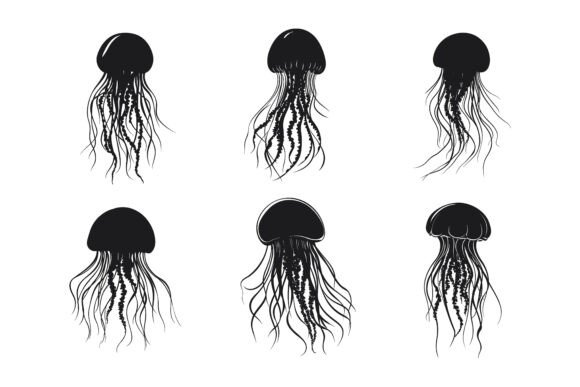
Jellyfish Silhouette: Capturing Oceanic Motion in Still Form
Some of the most striking design elements come from nature stripped down to its simplest visual essence. A jellyfish silhouette carries something few other forms can match—an immediate sense of fluidity, a quiet drama, and a shape that feels both alien and deeply familiar. Whether you are crafting a brand identity, designing an app interface, or laying out an editorial spread, the suspended motion of a jellyfish can anchor a composition with unexpected power.
What makes the jellyfish form so versatile is the way it occupies space. The bell curves upward with organic tension, the tentacles trail downward in rhythmic lines, and the overall silhouette creates a natural vertical flow that guides the eye. This inherent dynamism means a jellyfish silhouette rarely feels static, even when rendered as a single flat shape. Designers who work with these forms quickly discover they behave more like a visual verb than a noun.
How Designers Are Applying Jellyfish Silhouettes Across Mediums
The jump from appreciating a silhouette to actually deploying it in finished work depends heavily on the format you have at hand. A jellyfish silhouette that arrives as a well-structured vector file opens entirely different possibilities than a flat raster image. Let's walk through the real scenarios where these illustrations earn their place.
Brand Identity and Logo Systems
Marine conservation groups, aquariums, wellness studios, and coastal hospitality brands frequently turn to jellyfish imagery for good reason. The silhouette communicates fluidity, adaptability, and a certain effortless elegance. In logo work, the ability to edit, recolor, and modify individual elements of a jellyfish silhouette becomes non-negotiable. You might need to isolate just the bell shape for a favicon, or extract a single tentacle curve to use as a decorative divider. Vector files with neatly organized layer structures make these extractions painless rather than a reconstruction project.
One practical consideration that often gets overlooked is how the silhouette reads at thumbnail sizes. A jellyfish with overly fine tentacle details may collapse into visual noise when scaled down for a mobile app icon or a social media avatar. The strongest jellyfish silhouette designs balance intricate detail with bold, recognizable mass—something you can evaluate quickly when the source file maintains clean separation between structural elements and ornamental linework.
Print Applications Where Detail Matters
In large-format print—think event backdrops, retail window displays, or gallery wall graphics—a jellyfish silhouette can carry an entire composition. The organic curves translate beautifully to cut-vinyl signage, screen-printed textiles, and foil-stamped stationery. Here, consistency across the illustration set becomes critical. If you purchase a collection that includes multiple jellyfish poses or species variants, each silhouette should maintain proportional line weights and stylistic cohesion, or the set feels disjointed when used together.
Print designers also benefit enormously from files that arrive ready for both Mac and Windows environments. Color profiles, font embedding, and path rendering can shift subtly across operating systems, and an illustration set built with cross-platform compatibility in mind removes one layer of pre-press anxiety. The inclusion of JPG companion files alongside vector originals means quick comping in layout software without the overhead of opening full AI or EPS documents for every placement test.
Digital Products and User Interface Design
App developers and UI designers might not immediately think of a jellyfish silhouette as interface material, but the form adapts surprisingly well to onboarding illustrations, loading states, empty-state graphics, and decorative background elements. The key here is color flexibility. A jellyfish silhouette that ships only in black demands extra steps to tint or recolor for light-mode and dark-mode interfaces. When the source AI and EPS files are built with easily selectable and modifiable color fills, adapting a single illustration across an entire app's color system takes minutes rather than hours.
Infographic designers face a similar workflow demand. A jellyfish silhouette used as a statistical marker or category icon needs to shift tones to match data visualization palettes. The ability to open an EPS file, select the bell or a specific tentacle group, and apply a new hex value without affecting adjacent elements saves enormous cumulative time on data-heavy projects. Organized layer naming—something as simple as "bell_base," "tentacle_group_01," and "oral_arms"—transforms an illustration from a static asset into a flexible design component.
Symbol and Icon System Integration
Symbol libraries for wayfinding, environmental graphics, or brand iconography benefit from nature-derived forms that feel universal. A jellyfish silhouette representing an aquarium exhibit, a marine biology program, or a spa treatment category carries more personality than a generic arrow or dot, while remaining simple enough to function at small sizes. The consistency of the illustration set matters here: if you pull a jellyfish from one source and a sea turtle from another, stylistic mismatches in stroke termination, corner radius, and overall density become glaring when placed side by side in a symbol family.
Having source files where perfection in details has already been addressed—anchors properly aligned, curves smoothed, redundant points removed—means less cleanup before the assets are production-ready. This attention to craft is what separates an illustration collection you actually use from one that sits in a downloads folder waiting for the "someday" that never arrives.
What Separates a Usable Jellyfish Illustration Set from a Frustrating One
Not all vector illustrations are created with the same standards. When you are evaluating jellyfish silhouette resources—whether for an immediate project or to build out your studio's asset library—several factors determine how much actual value you will extract.
File Architecture and Layer Organization
Open an EPS or AI file and find every shape dumped onto a single layer, and you know immediately the hours ahead will involve hunting, grouping, and reorganizing before any creative work can begin. A thoughtfully built file separates major anatomical zones—bell, oral arms, marginal tentacles—into named groups, often with sub-layers for left and right elements. This structure mirrors how you will actually need to access and modify the artwork. Need to create an asymmetric variant where tentacles flow in one direction? With organized layers, you select, delete, or reposition in seconds.
The best collections also consider both Mac and Windows users from the outset, testing file compatibility across operating systems so that paths render correctly regardless of platform. This cross-platform diligence prevents the dreaded moment when a client or collaborator opens your carefully prepared file and sees garbled shapes or missing elements.
Editability Beyond Basic Recoloring
Changing the fill color of a silhouette is table stakes. The real test of editability is whether you can modify the structure itself—shorten tentacles, widen the bell, remove internal detail lines, combine elements from two different jellyfish in the set—without breaking the artwork or spending hours with the pen tool reconstructing what should have been adjustable from the start. Vector files built with non-destructive techniques and minimal expanded appearances give you this latitude.
Designers working across print, web, symbols, apps, and infographics need one illustration to serve many masters. A jellyfish silhouette destined for a 300-dpi magazine layout might later appear as a 32-pixel app icon, then get enlarged for a trade show banner. The source file has to hold up at every scale without revealing rough curves or inconsistent line terminations. This is where the phrase "perfection in details and consistency" stops being marketing language and becomes a genuine technical requirement.
Format Flexibility and Companion Files
The inclusion of AI, EPS, and JPG formats in a single package addresses different stages of the design workflow. AI files serve as the master working document in Adobe Illustrator. EPS files provide broader compatibility with other vector applications and older software versions. JPG files offer immediate preview and quick placement in presentations, mockups, or non-vector workflows. You don't always need the full editable vector when you are roughing out concepts, and having pre-rendered raster versions saves those small but cumulative friction points throughout a project.
Anticipating Where Jellyfish Silhouettes Will Travel in Your Work
One exercise that helps when selecting an illustration set is to mentally run the asset through your next six months of likely projects. Will that jellyfish silhouette still look crisp when your client requests it in gold foil on a dark navy business card? Can you isolate and recolor certain tentacles to match a brand's secondary palette without adjacent colors bleeding? If an infographic deadline hits and you need a version with the bell hollowed out to hold a data point, does the file structure support that modification or fight it?
Answering these questions before purchasing means you invest in assets that compound in usefulness rather than create bottlenecks. A jellyfish silhouette that arrives as a thoughtfully constructed, cross-platform-compatible, meticulously organized illustration set pays for itself the first time you avoid rebuilding something that should have been ready to use.
The ocean offers endless inspiration, but design deadlines don't have endless flexibility. Having illustration resources that arrive prepared—with clean layer hierarchies, smooth paths, companion raster files, and true cross-platform reliability—keeps the focus where it belongs: on the creative decisions that make your work distinct, not on the technical wrestling that drains time and energy before you even begin.