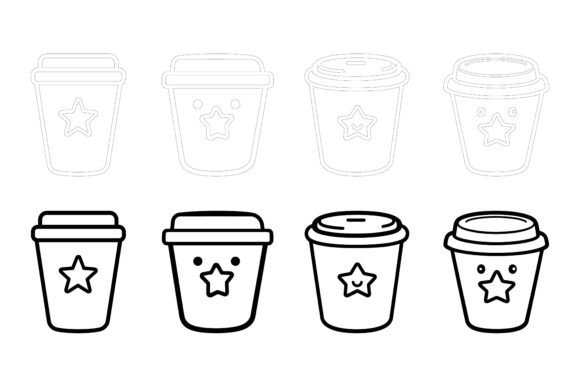
Cute and Funny Coffee Cups for Every Project
Whether you’re designing a café menu, building a social media campaign, or personalizing a greeting card, the right visuals can make all the difference. The Cute and Funny Coffee Cups AI EPS illustration set offers a collection of hand-crafted coffee cup icons, characters, and scenes that blend humor with charm. In this article, we’ll explore what makes these assets unique and how different people—from first-time designers to seasoned business owners—might use them in ways that fit their own goals.
What Exactly Is the Cute and Funny Coffee Cups Set?
At its core, this collection is a downloadable bundle of vector and raster graphics. It includes AI EPS and JPG files, so you aren’t locked into a single workflow. Each illustration centers on coffee cups with expressive faces, playful steam swirls, witty captions, and cheerful color palettes. The files are designed for both Mac and Windows users, and they arrive with a neatly organized file and layer structure. That means you won’t waste time hunting through a messy group of unlabeled paths. Instead, you can open the editable source file and immediately see how everything is grouped—making it simpler to change colors, resize elements, or tweak the shape of a smile on a latte.
Whether you’re printing a high-resolution poster or creating an app icon that needs to look crisp at 64×64 pixels, the perfection in details and consistency across the set helps maintain a professional finish. The same character style carries through, so a “sleepy coffee cup” on a website header will feel related to a “grinning espresso shot” on a flyer. That visual coherence is something marketers and educators often appreciate because it builds a recognizable tone without extra effort.
Why Versatility Matters to Different Users
One person might download these graphics to quickly populate a personal blog about morning routines. Another might need them for client work where brand guidelines require specific hex color codes. Both see value, but their priorities differ. The editable nature of the AI EPS files means you can change colors and modify the icon so easily according to your needs—no Illustrator expert required, though experts will enjoy the clean structure too.
For Small Business Owners and Café Managers
If you run a coffee shop or a small bakery, you know how costly custom illustrations can be. The Cute and Funny Coffee Cups set gives you a library of ready-made visuals that feel like they were drawn just for your brand. You can adjust the colors to match your signage, print them on loyalty cards, or use them on digital menu boards. Because the files are suitable for print and web, you don’t need different formats for your Instagram posts and the physical banners inside your store. One owner we spoke with described how she recolored the “happy latte” character to match her shop’s pink-and-mint theme, then used it across a dozen touchpoints—from window decals to email footers. The speed and cost savings mattered more to her than having a designer start from scratch.
For Freelance Designers and Agencies
Time is money in client work. A freelance graphic designer might use these coffee-themed illustrations when building a quick landing page for a coffee subscription service. Since the files are layered and organized, they can quickly isolate a single cup, export it as an SVG, and drop it into a web mockup. Perfection in the details—like the gradient on a coffee bean or the curve of a steam line—means the final output looks polished even when scaled. The AI EPS format also allows complete customization, so if a client says, “We love it, but can you make the cup green?” you aren’t stuck with a flat JPG. You just open the vector file, adjust a fill color, and send an updated preview. That flexibility can strengthen client relationships and reduce revision rounds.
For Educators and Content Creators
Teachers, online course creators, and YouTubers often need visuals that are friendly and not intimidating. A funny coffee cup doodle on a handout about study habits can make the material more relatable. Since the set includes JPG files, you can drop them directly into presentation software without any design skills. Meanwhile, a blogger writing about productivity might use the whimsical mugs to break up long text sections. The illustrations add personality without distracting from the message. You could even create a simple infographic about caffeine levels using the cup icons as visual markers—suitable for print, web, symbols, apps, infographics, the assets cover all these bases without requiring multiple purchases.
For Hobbyists and DIY Enthusiasts
Not every user is a business professional. Someone planning a coffee-themed party might print the funny cups on stickers, cupcake toppers, or invitations. Because the files are neatly organized, a beginner can open a basic editing program and see clearly labeled layers like “steam,” “face,” “cup body.” Even a lightweight app that reads EPS files will let you adjust a color or delete a background. This accessibility makes the set appealing to people who want to personalize projects without a steep learning curve. The joy of holding a physical item you created—like a tote bag with a grinning espresso shot—can be a powerful motivator to keep exploring design tools.
How Professionals Evaluate Speed, Reliability, and Quality
Experienced users often look at a file’s structure before anything else. A disorganized vector mess can cost hours. Here, the promise of a neatly organized, file, and layer structure speaks directly to that pain point. When every element is labeled, you can make bulk edits—say, changing all cup shadows from dark gray to navy—in seconds. The consistency in illustration style also reduces the need to manually tweak proportions. If you’re assembling a set of app icons, you don’t want one cup looking hand-drawn and another looking geometrically perfect. These assets maintain the same level of detail, so the set works as a cohesive family.
Reliability also comes from the file formats included. AI and EPS are industry standards, and JPG serves as a fallback for quick previews or non-design software. The fact that the files are designed to work on Mac and Windows removes friction in mixed-environment teams. No more “It won’t open on my computer” messages.
Practical Ways Different Audiences Put These Illustrations to Work
Let’s walk through a few realistic scenarios. A marketing coordinator at a tech startup needs social media graphics for a “Morning Kickstart” campaign. She downloads the Cute and Funny Coffee Cups set, picks the animated-style mug with widened eyes, changes its color to match the company’s brand hex (#FF6B6B), and places it next to a product screenshot in Canva. The result looks custom without a single email to the design department.
A business coach who sells a PDF workbook on peak productivity might use the contemplative coffee cup character as a section divider. By opening the EPS file in Affinity Designer, she resizes the illustration, lowers its opacity, and uses it as a subtle watermarked background. The layered file makes it easy to isolate the cup without the steam, giving her design flexibility that a flat PNG couldn’t offer.
A print shop owner receives an order for 500 coffee-themed stickers. The client wants a specific vintage teal color instead of the original brown. The owner locates the “cup body” layer, applies a color overlay, and sends a quick proof. Because the vector lines stay crisp no matter the size, the stickers look sharp on laptops, water bottles, and car bumpers alike.
Understanding Different Priorities When Choosing an Illustration Set
When you’re evaluating whether a collection like this fits your needs, it helps to consider what you value most. For some, ease of use tops the list—they want to drag and drop without touching a vector program. The JPG files and the clear layer naming serve that crowd. Others prioritize creative control; they want to edit every anchor point, combine shapes, and repurpose elements into something entirely new. The AI EPS files, with their preserved editability, satisfy that desire.
Cost matters differently: a student might need affordable assets for a semester-long project, while a design agency sees the price as a rounding error compared to the time saved. Quality and consistency matter universally—nobody wants a pixelated mess when printing at A3 size. The attention to detail here, from anti-aliased edges to consistent line weights, means the file works across resolutions without degradation.
Then there’s the dimension of learning value. Beginners can study how professional illustrations are structured by opening the EPS file and exploring the layer hierarchy. That alone can be an educational resource for someone learning vector software. The ability to practice recoloring, ungrouping, and rearranging parts offers a low-stakes way to build confidence.
Is This Collection Right for Your Project?
Ask yourself what kind of message you want to send. If your project calls for warmth, humor, and a touch of personality, coffee cups with expressive faces might be a perfect fit. If you need sterile corporate clipart, this probably isn’t it. Consider your skill level: you absolutely don’t need to be a designer to use the JPGs, but having some familiarity with vector software will unlock far more potential. Think about the mediums you’ll use. The set’s versatility across print, web, apps, and infographics means you can repurpose the same characters in multiple places, creating a consistent visual thread.
A common hesitation is, “But I don’t want my stuff to look like everyone else’s.” That’s where the editability becomes crucial. By changing a color palette, adjusting the curve of a handle, or combining elements from different files, you create something that feels uniquely yours. The original design is a starting point, not a final destination. A blogger could twist the “grumpy mug” into a mascot for late-night writing sessions; a café could turn the “winking cappuccino” into a loyalty stamp. The same underlying asset takes on new life in different hands.
Another concern might be file compatibility. The set is explicitly designed for Mac and Windows, and the AI EPS format works with Adobe Illustrator, CorelDRAW, Affinity Designer, Inkscape, and many free viewers. Even if you switch operating systems later, your files remain accessible. JPG previews are universally viewable, so you can browse the collection without opening a design program at all.
Bringing It Together Without the Hype
Rather than tell you this collection is amazing, we’d rather highlight how it addresses real-world needs. The Cute and Funny Coffee Cups set offers organized vector files, high-quality JPGs, and a level of detail that holds up under scrutiny. It respects your time by giving you a clean starting point. It respects your creativity by staying editable. And it respects your budget by bundling a wide range of assets that can fill multiple roles.
If you’re a creator who wants to add personality to a project without reinventing the wheel, these illustrations provide a frictionless way to do that. If you’re a professional who needs reliable files that won’t break when scaled or recolored, the AI EPS format and careful layer structure deliver. And if you’re just someone who loves coffee and wants to make something that makes people smile, the playful expressions and charming details will likely feel like they were worth the download.
The beauty of a well-made asset library is that it adapts to you. Its usefulness grows with your skills, and its applications expand with your imagination. Whether you’re creating an app icon, a printed postcard, a website banner, or a fun t-shirt, having a dependable set of cute and funny coffee cups at your fingertips can turn a bland layout into a memorable one.